Say it on site.
It’s on the record.
Nobody fills in a hazard form with gloves on. With Haznote, your crew holds one button and says what they see. You get a drafted WHS record with their words, the photo and the location, ready to check and confirm.
Opens your email app. Nothing is collected on this site.
- Works with no signal
- Workers are free
- Built for the WHS Act 2011
Recorded offline
voice 0:18 · 2 photos · GPS ±6 mSent
signal restored · queue deliveredAI draft, manager confirms
Working at height · priority suggestedPossibly notifiable, WorkSafe Victoria
suggestion only · a manager decidesPDF generated
requested by a manager · AI disclosure in footer
How many hazard reports did your crews send last month?
If it’s fewer than five a site, the tool you have isn’t working. Crews aren’t careless. The form takes longer than the fix, nobody wants to be the one who dobbed, and last time nothing changed anyway. Haznote takes away all three.
- Barrier 01 · Effort
“The form takes longer than the fix.”
One button and a voice note. No required fields, no dropdowns, no typing with gloves on.
- Barrier 02 · Exposure
“Everyone will know it was me.”
A worker can leave their name off. Photos on an anonymous report lose their GPS and camera details before they’re stored.
- Barrier 03 · Futility
“Last time nothing happened.”
The worker sees their report move to fixed. A high-risk report can’t be closed without a photo of the fix.
One button in the field. One queue at the desk.
Your crew talks. You read, check and confirm. The same report, from both ends of the day.
Your crew talks. Haznote drafts. You decide.
The worker is done before the phone is back in their pocket. You read the draft, fix what’s wrong and confirm it.
- 01 / Capture
Hold, talk, send.
Hold the button and say what you see. Add a photo if it helps. Location goes on by itself. In the basement with no signal? The report waits on the phone and sends once you’re back up top.
- Voice
- Photos
- GPS
- Offline queue
- 02 / Review
AI drafts. You confirm.
Haznote writes up the voice note, suggests a category and priority, and flags anything that looks notifiable. It gets things wrong sometimes. That’s why nothing is final until a manager confirms or fixes it.
- Transcript
- Classification
- Notifiable flag
- 03 / Record
A record you can hand over.
Confirmed reports become a WHS PDF. The AI’s draft and the manager’s edits are kept apart, so anyone can see who decided what. Incidents are marked, never deleted.
- WHS PDF
- Audit trail
- Never deleted
Opens your email app. Nothing is collected on this site.
A tick in the site office isn’t a corrective action.
On most checklists a hazard gets ticked off from the desk while it’s still hanging over someone’s head. In Haznote a manager sets likelihood and consequence, and a high score locks the close button on the server, not in a reminder.
Risk matrix · tap a cell
Likelihood 4 × consequence 4 = 16
Close refused
The server won’t close this one until the fix is written down and an action carries a photo of the result. There’s no warning to click past.
Made for the crew first.
If the crew won’t use it, nothing reaches you. So the worker side is one button, works with gloves on and costs nothing.
Workers
Free. One button. Gloves on.
- Voice, photos and location in one report
- Sends itself when the signal comes back
- Report confidentially when it matters
Managers
Every site in one list.
- Most urgent reports at the top
- Confirm or edit every AI suggestion
- A possibly-notifiable flag names the likely regulator
Admins
Sites, people and billing.
- Add a site, put up its QR code, the crew scans in
- Pay per site or company, never per head
- Confidential reports skip site managers
The record you want in your hand when the inspector turns up.
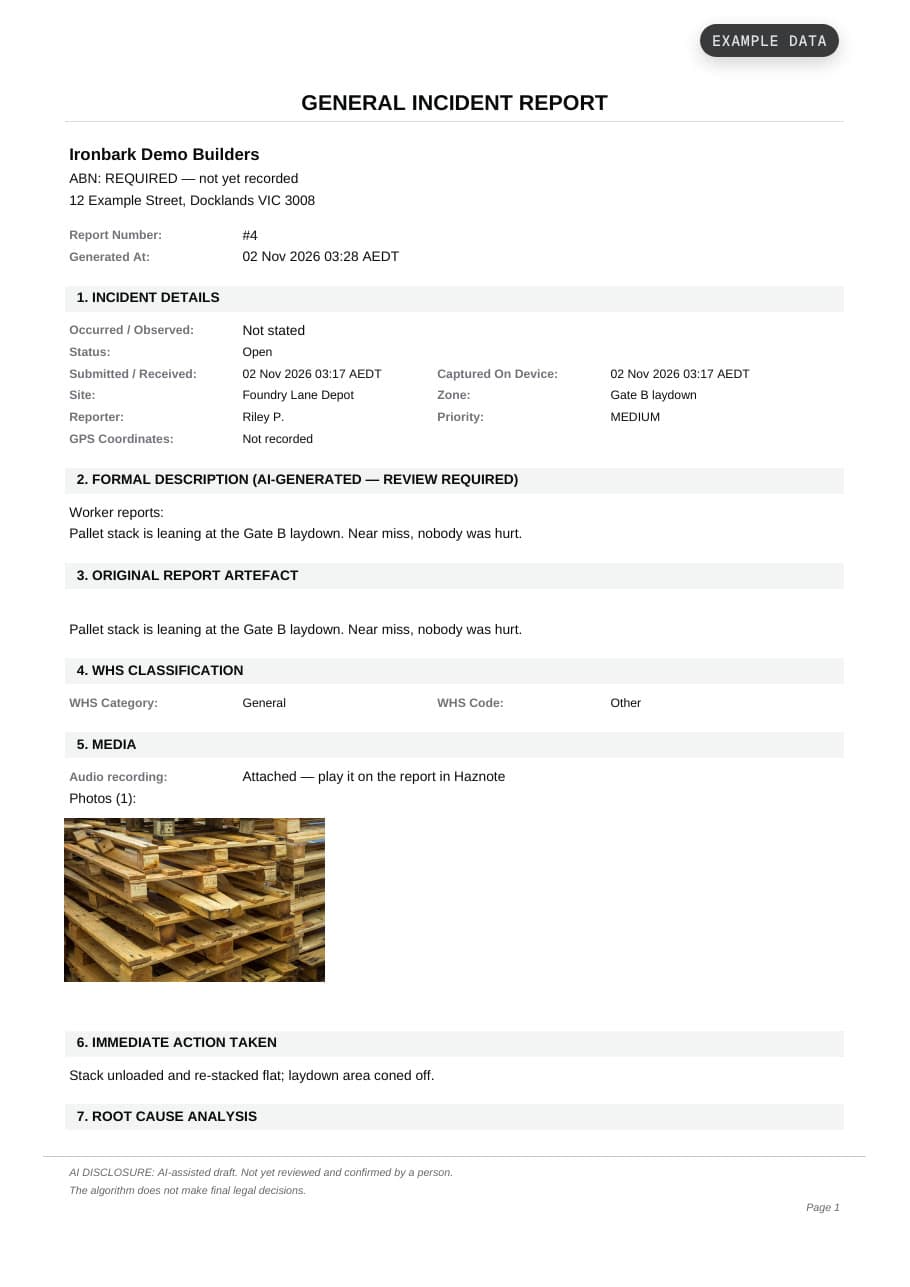
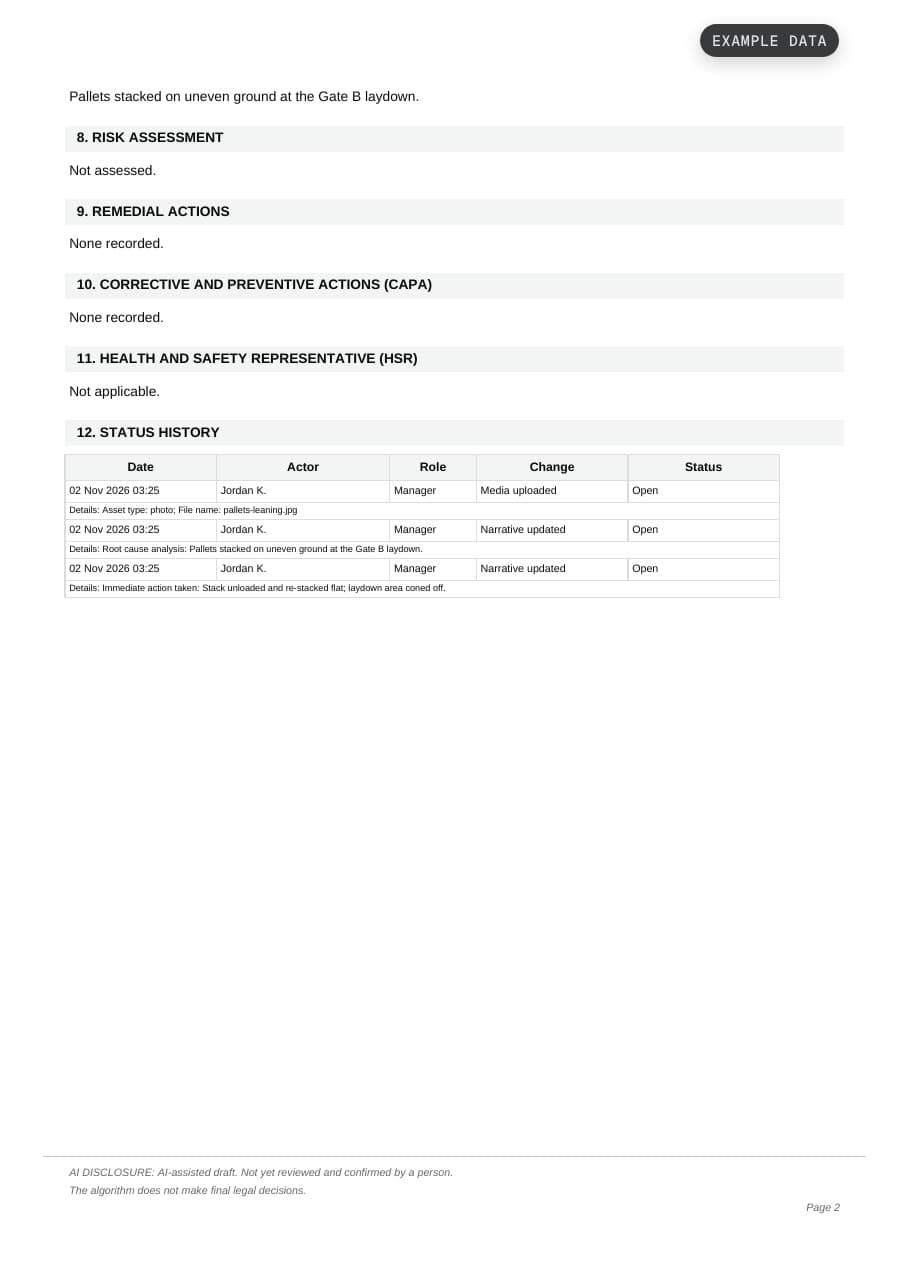
This is what a confirmed report looks like as a PDF. It’s a sample built from example data. No customer data, and no live AI on this site.
- Company, ABN and report number
- When it occurred and when it was received, as separate rows, and whether the regulator has been notified
- The AI’s formal description next to the worker’s original words
- WHS category and code, media, actions, CAPA and status history
- An AI disclosure on every page that says whether a person has reviewed the draft, and who
Who it’s for, and who it isn’t.
Built for you if
- You’re a builder or principal contractor with a few active sites and a crew that changes every month
- There’s no full-time safety team. A site manager, a coordinator or the owner carries it
- You’re the one the regulator would call
- Your crews send a handful of hazard reports a month, or none
Not for you if
- You already run an enterprise platform with permits to work. You don’t need us
- You want SWMS, inductions and site sign-on. We don’t write SWMS
- You want a checklist and audit suite. Keep the one you have and run Haznote beside it
Pay per site. Your crew is free.
No “contact sales”, no quote. The price is right here, and twenty workers or two hundred, it doesn’t change. Prices are in AUD, excluding GST. Team is the plan every trial starts on. Which plan fits, and annual billing, are on the pricing page.
Per-seat pricing is why crews stay off the app.
When every login costs money, the sensible call is to license a few managers and leave everyone else on paper. The people closest to the hazard end up outside the system. Haznote prices the site, not the person. Move the sliders.
A$800
40 × A$20 a month
A$249
3 sites, any crew size
You keep A$551 a month. That’s A$6,612 a year, and nobody gets left off.
AUD a month, ex-GST, monthly billing. The plan is the cheapest one for your number of sites. Manager limits apply, see the pricing page.
Site
One site and a small team.
A$99AUD ex GST · billed monthly/month
- 1 active site
- 3 managers (plus 1 Admin)
Team
RecommendedSeveral sites and subcontractors. Every trial starts here.
A$249AUD ex GST · billed monthly/month
- 5 active sites
- 10 managers (plus 1 Admin)
Business
Larger deployments, with a rollout session.
A$499AUD ex GST · billed monthly/month
- 20 active sites
- Unlimited managers (plus 1 Admin)
Trial: 30 days on Team, no card. No permanent free plan. Workers are never priced.
Twenty founding spots. A company that takes one keeps today’s price for as long as it stays subscribed.
Before you ask.
Will my crew actually use it?
That’s what it’s built around. One button, talking instead of typing, and it works with gloves on and with no signal. Workers don’t pay. A manager adds them, or they join by scanning the site QR code.
How long does it take to set up?
There’s no hardware and no install day. Add a site, put its QR code up at the gate and your crew scans in. You can have the first report on your screen today.
Does the AI decide what’s notifiable?
No. The AI suggests a classification and flags reports that look notifiable. A manager checks it, fixes it if it’s wrong and confirms it. The AI’s original draft is kept apart from the manager’s edits, so you can see who decided what.
What happens with no signal on site?
The report is saved on the worker’s phone and sends itself when the connection is back. Nothing to retype.
Can an incident be deleted?
No. Incidents are marked as resolved or archived, never deleted, so the record and its audit trail stay intact.
Is Haznote legal advice?
No. Haznote helps you keep WHS records and names the regulator you may need to notify. You remain responsible for your obligations under the WHS Act in your state or territory.
Time your hazard form. Then time Haznote.
If the form wins, keep the form. Haznote is in private pilot with Australian construction and industrial teams. Email us and we’ll send you access.